

I spent the first two years of working from home blaming my keyboard, my stress levels, and my general lack of movement for the low back ache that showed up every afternoon around two o'clock. I tried a standing desk converter. I bought a lumbar cushion that fell off the back of my dining chair every forty minutes. I watched YouTube videos about hip flexor stretches. None of it stuck because I was treating symptoms while ignoring the cause: eight hours a day in a chair that was not built for sitting eight hours a day. If your lower back, your hips, or your mid-spine hurt after a full remote workday, this guide is for you. These are the five steps I use now, in order of impact.
Still sitting in a dining chair, a gaming chair, or something from 2014? That is the first problem.
The GABRYLLY ergonomic chair has adjustable lumbar support, flip-up arms, and a headrest. It is what I replaced my old chair with, and it is where I would start if I were building a pain-free setup from scratch. Over 14,000 Amazon reviews back it up.
Amazon Check Today's Price on Amazon →Step 1: Audit What Your Chair Is Actually Doing to Your Spine
Before buying anything, sit down in your current chair and pay attention for sixty seconds. Is your lower back touching anything, or is it floating in a gap between the seat and whatever padding exists behind you? Is your pelvis tilting backward so your tailbone carries your weight instead of your sitting bones? Most inexpensive chairs, and most dining chairs pressed into office duty, put the lumbar curve support in the wrong place, which means your spine rounds forward for eight hours straight. Rounded spine plus desk work equals exactly the pain you are feeling.
The test is simple. Sit all the way back in your chair, press your lower back against the backrest, and check whether the contour actually meets the inward curve of your lumbar spine (roughly two to four inches above your beltline). If there is a gap, or if the chair back is flat and hard, you have found the primary culprit. Write that down before moving on.
Step 2: Set Your Chair Height So Your Hips Are Level With Your Knees
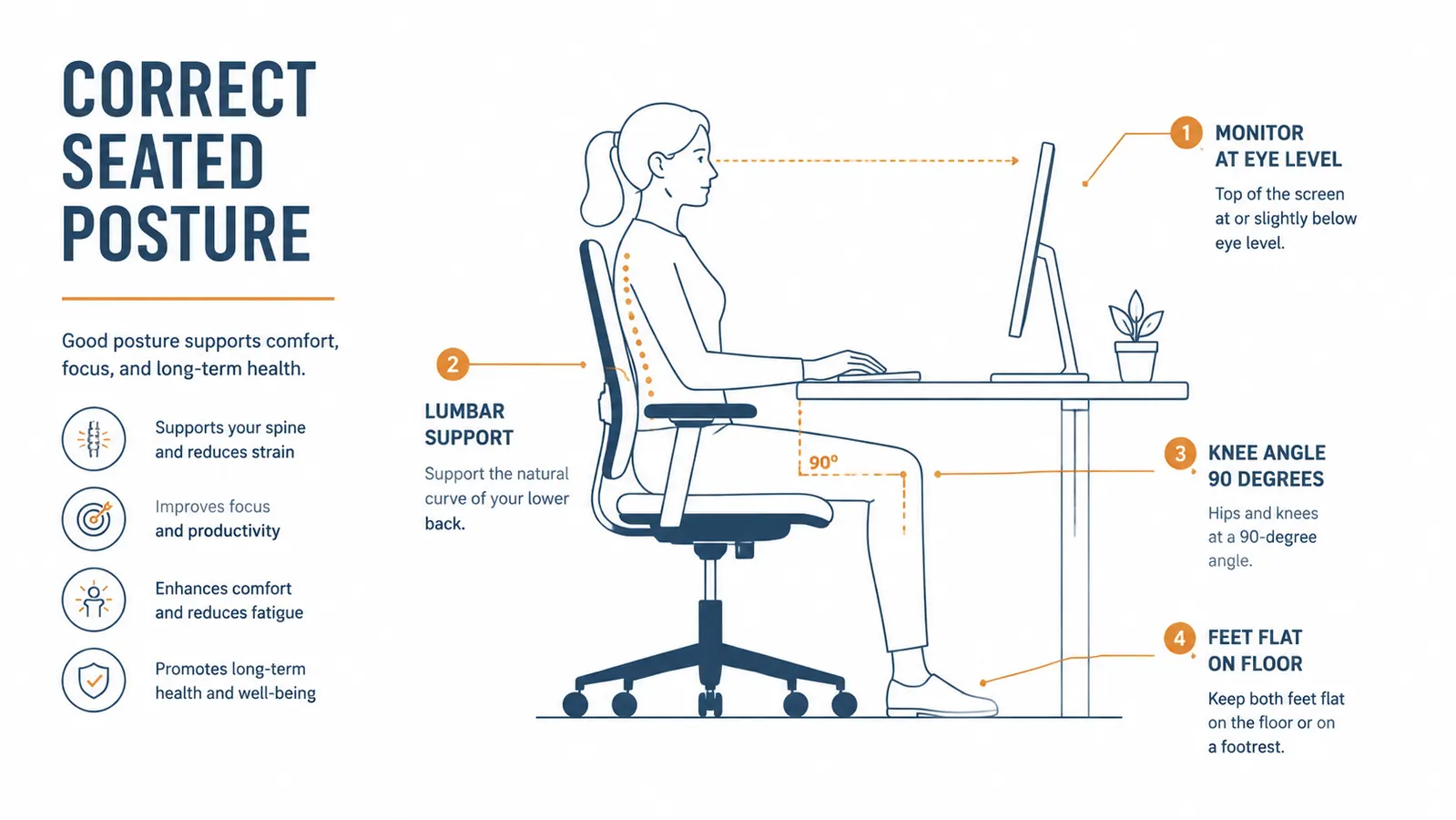
Chair height is the most under-adjusted setting in a home office, partly because most people set it once when the chair arrives and never touch it again. The correct position is not about a number on the gas cylinder. It is about geometry. Your thighs should be roughly parallel to the floor. Your knees should bend at around ninety degrees. Your feet should be flat on the ground, not dangling or tucked under the chair. When any of those three conditions breaks down, your pelvis tilts, your lumbar curve collapses, and the pain follows.
If you drop the seat low enough to get your feet flat but your thighs are now angled downward, your desk is probably too high for your body. A keyboard tray or a monitor arm that lifts your screen higher can compensate without raising the chair. If you raise the chair to get thighs level but your feet leave the floor, a footrest solves it cleanly. Get the chair geometry right first, then adjust everything else around it.
Step 3: Dial In Lumbar Support So It Meets Your Curve, Not Someone Else's
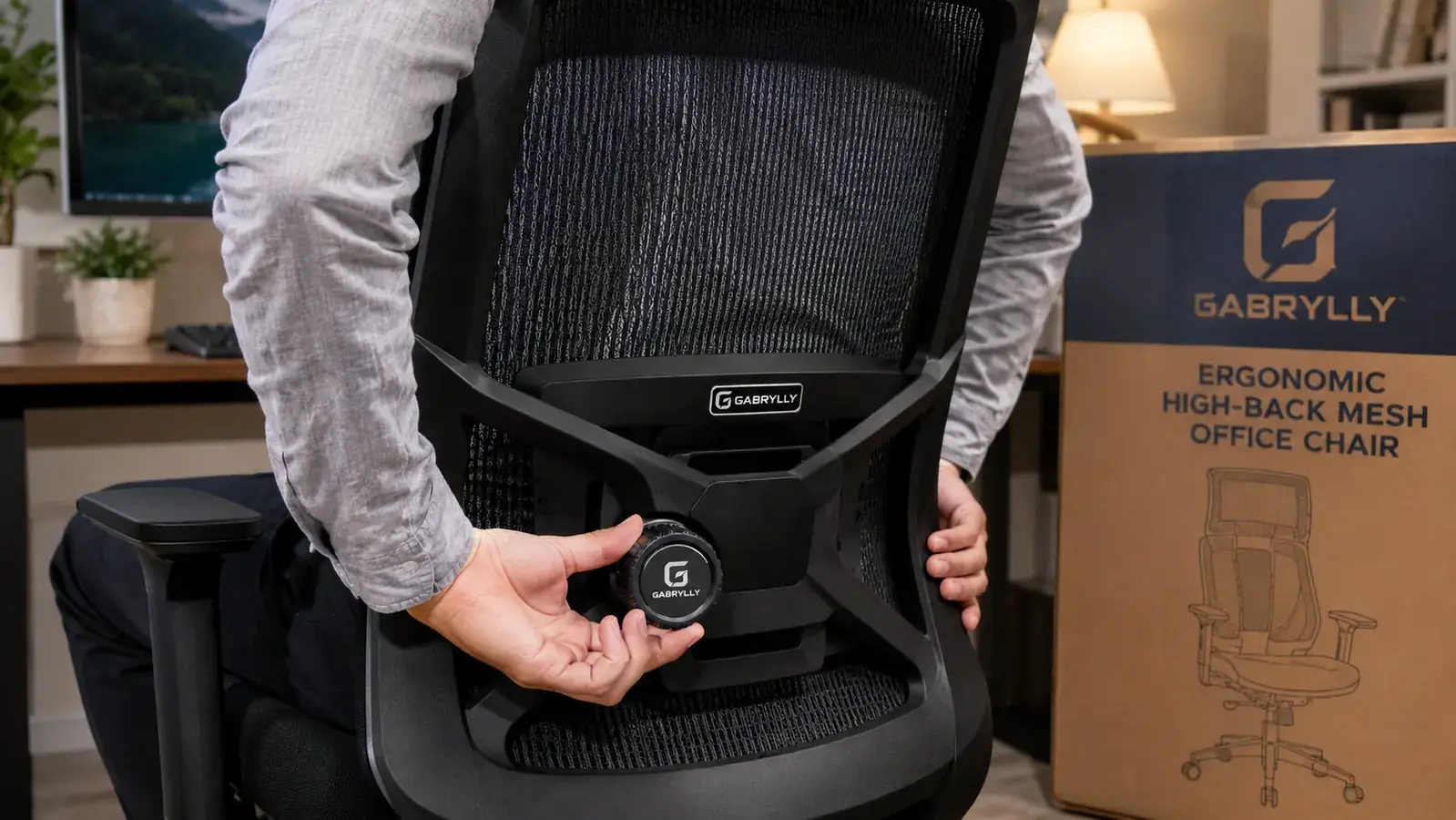
This is where a chair with actual adjustable lumbar support earns its price. Fixed lumbar cushions are built around an average body, which means they fit a fraction of users well and mildly annoy everyone else. A chair with a height-adjustable lumbar pad, like the GABRYLLY ergonomic chair, lets you move the support up or down until it sits exactly where your inward curve lives. That sounds like marketing copy until you actually do it and feel your back relax into the backrest instead of fighting it.
The process takes about two minutes. Sit all the way back. Loosen the lumbar adjustment. Move the pad up until you feel it pressing lightly into the correct spot, usually between your waistband and the bottom of your ribcage. Then tighten it and check that the pressure is firm but not shoved. You should not have to muscle your way into the backrest. If you find yourself leaning forward to get comfortable, the lumbar pad is either too high or too aggressive. The goal is a backrest you want to lean into, not one you avoid.
Eight hours in the wrong chair will undo every stretch, every standing break, and every foam roller session you throw at the problem. Fix the chair first.
Step 4: Position Your Monitor and Keyboard So Your Neck and Shoulders Stop Compensating
Lower back pain often has a neck and shoulder component that remote workers do not connect at first. When your monitor is too low, you hunch forward to see it. That hunch shifts weight forward off the backrest and puts it on your lumbar discs and hip flexors instead. The fix is straightforward: the top of your monitor should be at or just slightly below eye level when you are sitting with your back against the chair properly. If your monitor is sitting flat on a desk, it is almost certainly too low unless you are unusually short.
A monitor arm solves this cleanly, but even a monitor stand or a stack of books gets the job done as a starting point. While you are adjusting height, check your keyboard position too. Elbows should be at roughly ninety degrees, forearms roughly parallel to the floor. Reaching up or reaching far forward both rotate the shoulder forward and eventually pull at the upper back. Keyboard trays are underrated if your desk runs high for your body.
Step 5: Use Movement as a Tool, Not a Punishment
A well-set-up chair and correct geometry will dramatically reduce daily pain, but no chair eliminates the need to move. Sitting, even in a good chair, compresses spinal discs over time and reduces blood flow to the posterior chain. The research on this is consistent: short, frequent breaks beat long, infrequent ones. Two minutes of movement every forty-five minutes does more good than a thirty-minute lunchtime walk while sitting still the rest of the day.
You do not need a standing desk to make this work. Set a timer for forty-five minutes. When it goes off, stand up, walk to get water, do a slow hip circle or two, and come back. The goal is not exercise. It is resetting the compression pattern. Over a few weeks this becomes automatic, and the two-o'clock back ache that once felt inevitable starts showing up less and less often.

What Else Helps Beyond These Five Steps
Once the five steps above are dialed in, a few secondary changes tend to move the needle further. A monitor at proper height reduces neck-driven back compensation. A footrest, if your feet do not comfortably reach the floor after correct chair height is set, reduces pressure under the thighs and keeps the pelvis from tilting backward. A chair mat on hard floors protects caster wheels and makes it easier to push back naturally without the chair resisting every movement, which affects how often you shift position throughout the day.
What does not help as much as the internet suggests: lumbar pillows strapped to non-adjustable chairs, standing for most of the day on a thin anti-fatigue mat without fixing the sitting setup, and stretching apps that target symptoms without changing the root cause. Stretching is valuable maintenance once your setup is correct. It is not a fix for a bad chair.
If you are in the market for a chair that covers the basics without requiring a premium commitment, the GABRYLLY ergonomic chair is the one I use and recommend to anyone who asks. Adjustable lumbar support, flip-up arms so you can pull into the desk cleanly, a headrest for calls, and PU caster wheels that roll smoothly on hardwood. It is not a Herman Miller. It does not need to be. At its price point it handles every adjustment that actually matters for preventing the daily ache that comes with remote work. You can read the full breakdown in the long-term GABRYLLY chair review, or if you are deciding between this and a competing chair, the GABRYLLY vs FlexiSpot BS13 comparison covers that side-by-side in detail.
Your setup is only as good as the chair holding it all together.
The GABRYLLY ergonomic chair has over 14,000 Amazon ratings, adjustable lumbar support, and flip-up arms. It is the starting point for a pain-free home office setup that actually holds up through an eight-hour day.
Amazon Check Today's Price on Amazon →